An appointment jotted in a note gets a reminder — no need to copy it into your calendar
How AI recognizes dates and times inside your notes and sets reminders for you, plus the iPhone models where this actually works.
Have you ever jotted down "dentist next Tuesday at 3" in a note, then later opened your calendar app and typed the exact same thing in again? You already wrote it down in the note — having to touch it a second time just to get a reminder is a quiet kind of annoying.
A schedule item that never makes it to your calendar gets forgotten
Notes are easy to write, but without a built-in reminder feature, you end up relying on memory. You'd need to copy it into your calendar to get a reminder at all, and remembering to do that extra step every time isn't easy. Sooner or later, something you clearly wrote down slips right past you.
It reads the date in your note and sets the reminder automatically
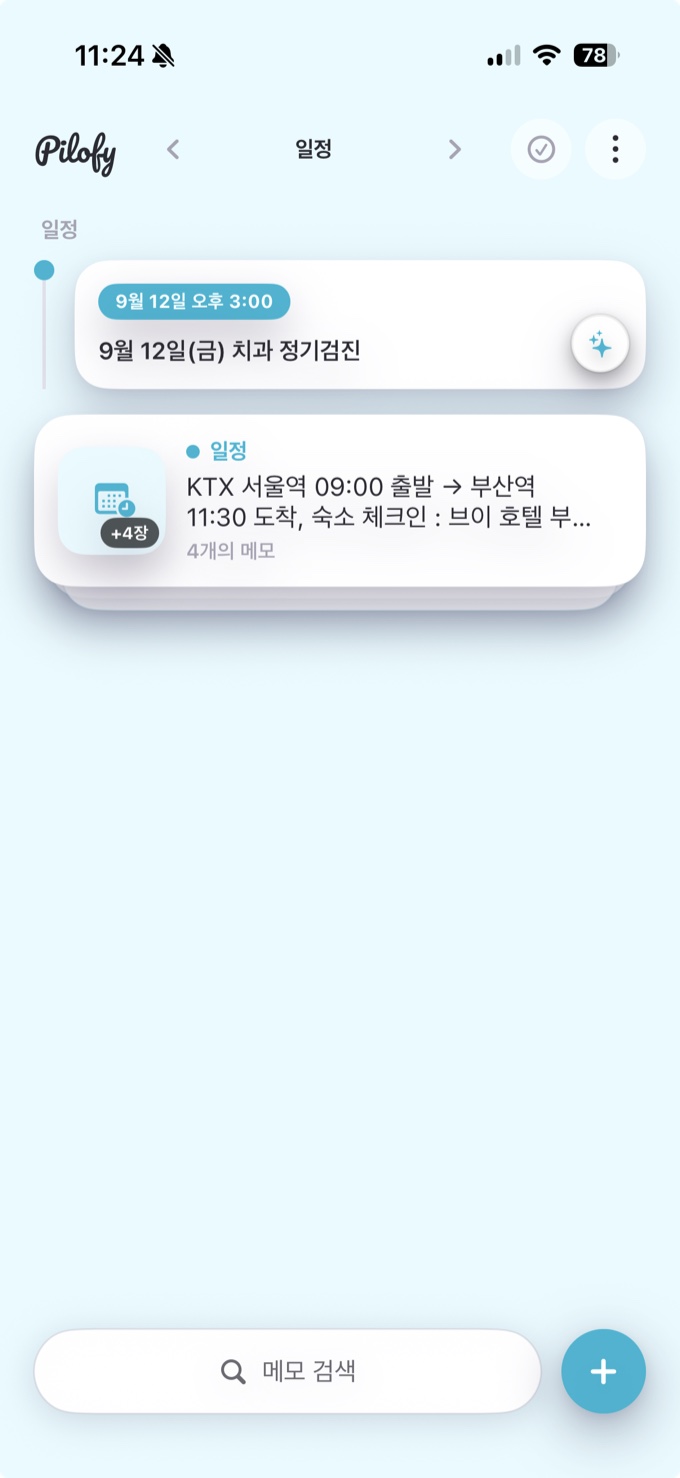
Pilofy recognizes the date and time written in a note and suggests a reminder automatically. By default it suggests one day ahead, but right before you save, a confirmation screen lets you switch it directly to at-the-time, one hour ahead, or one day ahead. There's no need to open a separate calendar app and copy anything over — writing the note itself carries through to the reminder.
One thing worth knowing ahead of time: this automatic recognition relies on Apple Intelligence, and it only works on iPhone 15 Pro or later. If you're on an older model, the same recognition is available another way — by watching an ad to unlock the online AI.