
Writing a note is easy.
Keeping them organized isn't.
Pilofy is an iOS note-taking app (a smart note app): just save a photo or some text, and AI automatically sorts it into the shape that fits — a receipt, a travel plan, a business card, and more.
Writing a note is easy, but at some point organizing them starts to feel like a chore, and notes you can no longer remember the point of start piling up. "I should sort these into categories" sounds nice — until you realize a person still has to do that sorting by hand, which just becomes one more chore. Search for how to organize notes better or digital minimalism and you mostly get the same answer: do it by hand, consistently. So we had AI take that over instead.
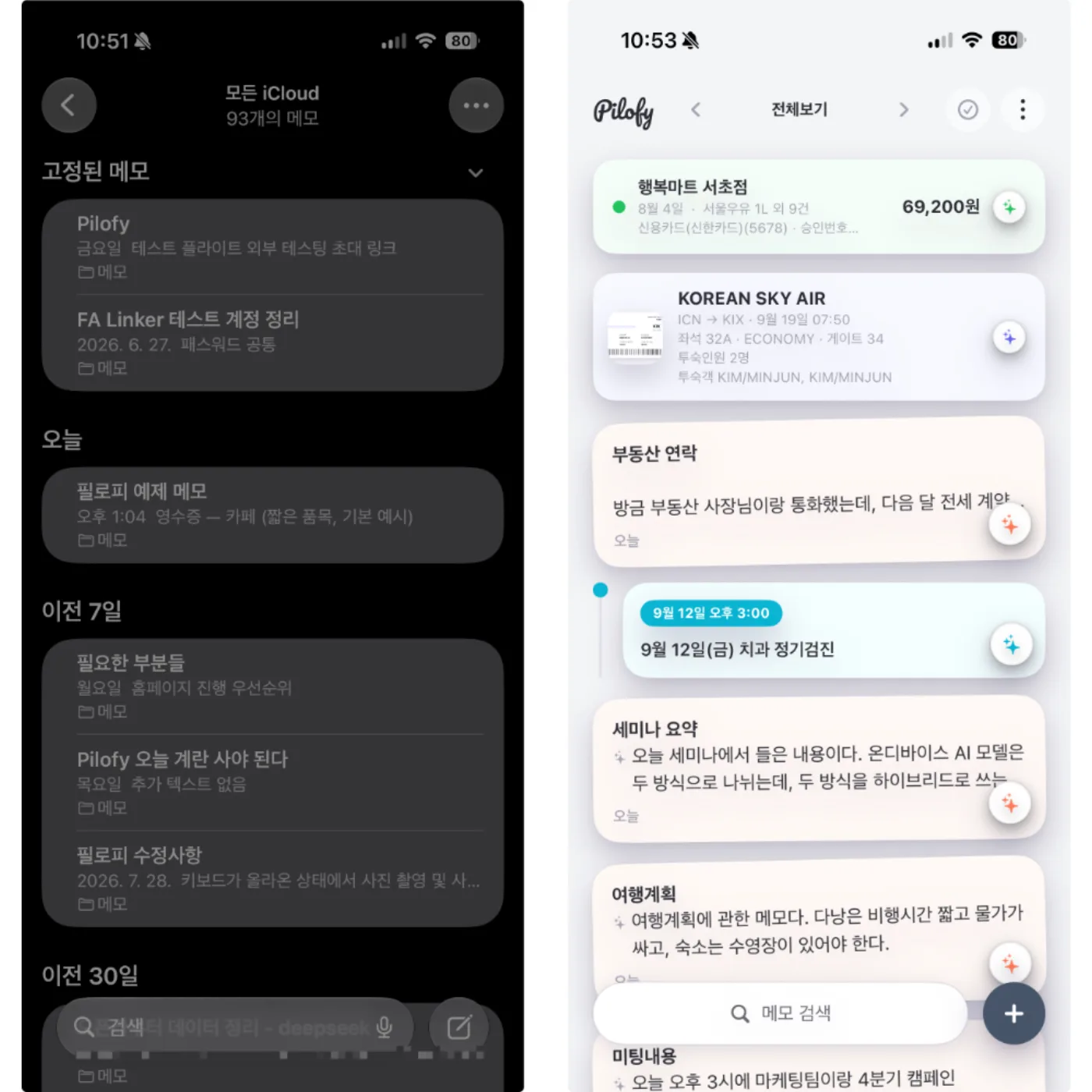
Finding a note is the whole point of Pilofy. Instead of opening a search box, you scroll through colorful cards until something catches your eye — though a keyword search is right there too, whenever you want it.
Every kind of note
gets sorted its own way
Pilofy doesn't stop at having AI sort your notes automatically. What kind of note it is decides what shape it ends up in.
- Receipts → A compact spending card
- Travel plans → A day-by-day timeline
- Business cards → A contact card
- Tickets & bookings → An itinerary card
- Notes with a date → Date detection + a reminder
AI figures out which shape fits each note, and sorts it into the right style automatically.
Here's what Pilofy
can do right now
Like a built-in receipt organizer — one photo becomes a spending record
AI reads the merchant, amount, date — and even the line-item breakdown of what you bought. Open a category and it automatically totals up everything spent inside it, so you get expense tracking without a separate budgeting app.
Write out a travel plan, get a day-by-day itinerary timeline
Save a note tangled up with dates and plans, and Pilofy asks first: "This looks like a note that needs sorting." Tap to sort it, and it turns into a timeline automatically organized by day — no spreadsheet or Notion doc needed.
Snap a business card, skip the filing — get a contact
AI reads the name, phone number, company, and email and organizes them. Add it straight to your iOS Contacts app if you want — business card scanning without the pile of cards on your desk.
Tickets and booking confirmations sort themselves too — no screenshot pile needed
Movie tickets, flights, train tickets, hotel bookings — Pilofy pulls out the details you'll actually search for later, like flight numbers, seats, and confirmation codes, and turns them into cards. Instead of a camera roll full of screenshots before a trip, every booking confirmation becomes a card you can actually find again.
Task and schedule reminders, automatic — just from a note
Pilofy detects the date and sets a reminder so nothing slips by. A note with several dates in a row gets compressed into one bundled card you can scan at a glance — no separate to-do or calendar app to open.
Made for moments
like these
- You want to track expenses from receipts, like a lightweight budgeting app
- You want trip itinerary planning without a spreadsheet or a Notion doc
- You keep meaning to try a business card scanner, but the cards just pile up in your camera roll
- Booking confirmations and reservation texts are scattered and impossible to find again
- You've tried task reminder apps before, but entering things always felt like a chore
- Opening Notion, Evernote, or GoodNotes feels like too much, so you just stop taking notes
Different from Notion
and Evernote — on purpose
It's not that one is better — they're built for different jobs. Notion, Evernote, and Apple Notes are tools where you design the system yourself. Pilofy is a tool where AI sorts things for you instead. If you don't want to spend time organizing, Pilofy is the better fit.
| Pilofy | Apple Notes | Notion | Evernote | |
|---|---|---|---|---|
| How it organizes | AI sorts automatically | You manage folders/tags yourself | You design databases/properties yourself | You manage notebooks/tags yourself |
| Receipt & business card recognition | Snap a photo, auto-recognized | Not supported | Not supported (manual entry) | Document scan yes, sorting manual |
| How you find things | Scroll color-coded cards + search | List + search | Filters, database views | Notebooks, tags, search |
| Data processing | On-device AI by default, online when you choose | On-device | Cloud | Cloud |
| Price | Core features free | Free (built into iOS) | Free–paid plans | Free–paid plans |
This is a rough comparison — each tool has its own strengths for different situations. If you already have a system in Notion that works, there's no need to switch. Pilofy is aimed more at people who stopped taking notes because organizing them felt like too much work.
On your device — online only when you need it
On-device AI is an AI approach that processes data like photos or text right on your device, instead of sending it to a server. It works fast without needing an internet connection, and your data never leaves your device, which is better for privacy too.
Pilofy's AI processing is on-device AI by default — it runs on iOS's Apple Intelligence, and it all happens on your device. Your photos and text never leave it — everything is processed right there on your phone.
This works properly on an iPhone 15 Pro or later, running iOS 27, the devices that support Apple Intelligence. When a situation calls for a closer look, you can choose — only if you want to — to bring in online AI to help.
- iOS 27 or later
- iPhone 15 Pro or later (Apple Intelligence–capable devices)
- Supports 15 languages, including Korean, English, Japanese, and Chinese
Supports 15
languages
Pilofy recognizes notes in 15 languages, including Korean, English, Japanese, Chinese, and Vietnamese. If you run into a receipt or business card in another language while traveling, Pilofy reads it exactly as written instead of translating it and risking a distorted result.
- English
- 한국어
- 日本語
- 中文
- Tiếng Việt
- +10 more
If you've been looking for a multilingual note-taking app, Pilofy organizes the same way no matter which language your note is in.
Where Pilofy stands right now
Core features are about 90% complete. Right now, we're focused less on adding new features and more on steadily measuring and refining how accurately AI recognizes your notes.
And that effort doesn't stop at launch.
- We'll keep validating and improving how AI recognizes notes across every language we support.
- We're not stopping at the categories we support today — receipts, travel, business cards, tickets, schedules — and plan to keep adding more.
- We'll keep taking recognition-error feedback from users and reflect every bit of it as the app keeps improving.
Frequently asked questions
- When does Pilofy launch?
- We're timing it to iOS 27's official release. Core features are mostly done already — right now we're continuing to fine-tune how accurately AI recognizes notes.
- What devices can I use it on?
- It runs properly on iOS 27 or later, on an iPhone 15 Pro or later that supports Apple Intelligence.
- Is it free?
- Basic features like writing, saving, and AI auto-sorting notes are free. Extras like ad removal and an online AI plan are planned as in-app purchases.
- Do my photos or notes get sent to a server?
- By default, everything is processed on-device with Apple Intelligence. Only when you choose to — for cases that need a closer look — can you bring in online AI to help.
- How is this different from other note apps like Notion, Bear, or Evernote?
- Most note apps leave the organizing to you. Pilofy is different — just save a photo or some text, and AI automatically sorts it into the shape that fits, whether that's a receipt, travel plan, business card, ticket, or schedule. You see the result as a colorful, organized card without ever creating or moving a folder yourself.
- Is Android supported?
- Right now it's iOS only. A macOS version is next on our plan, and we're looking into Android and Windows down the road, but nothing's locked in yet.
- Do my notes carry over to my other devices?
- Yes — everything syncs through iCloud, so your notes carry over to Pilofy on any other device signed into the same account.
- Is there a dedicated business card scanner?
- Yes — snap a photo of a business card and AI automatically reads the name, phone number, company, and email into a contact card, just like a dedicated business card scanner. You can add it straight to your iOS Contacts app too.
- Can I use it as a budgeting or expense-tracking app?
- Save a receipt photo and Pilofy automatically reads the merchant, amount, and line items, then totals up your spending by category. It's not as detailed as a dedicated budgeting app, but it's more than enough for organizing receipts and seeing where your money went.
- Does it work like a task reminder or schedule app?
- Yes — save a note with a date in it, and Pilofy automatically detects it and sets a reminder. Notes with several dates in a row get bundled into one card, so you can scan your schedule at a glance, just like a dedicated reminder app.
 Contact
Have a question about Pilofy? Feel free to reach out.
note@pilofy.app @pilofy.smart.memo