
Receipt Turned Black or Faded? How to Recover a Blurry Thermal Receipt
Faded receipt, blurry receipt, or a receipt that turned black? Here's whether you can restore it, what still works, and how to recover the details when the text is gone.
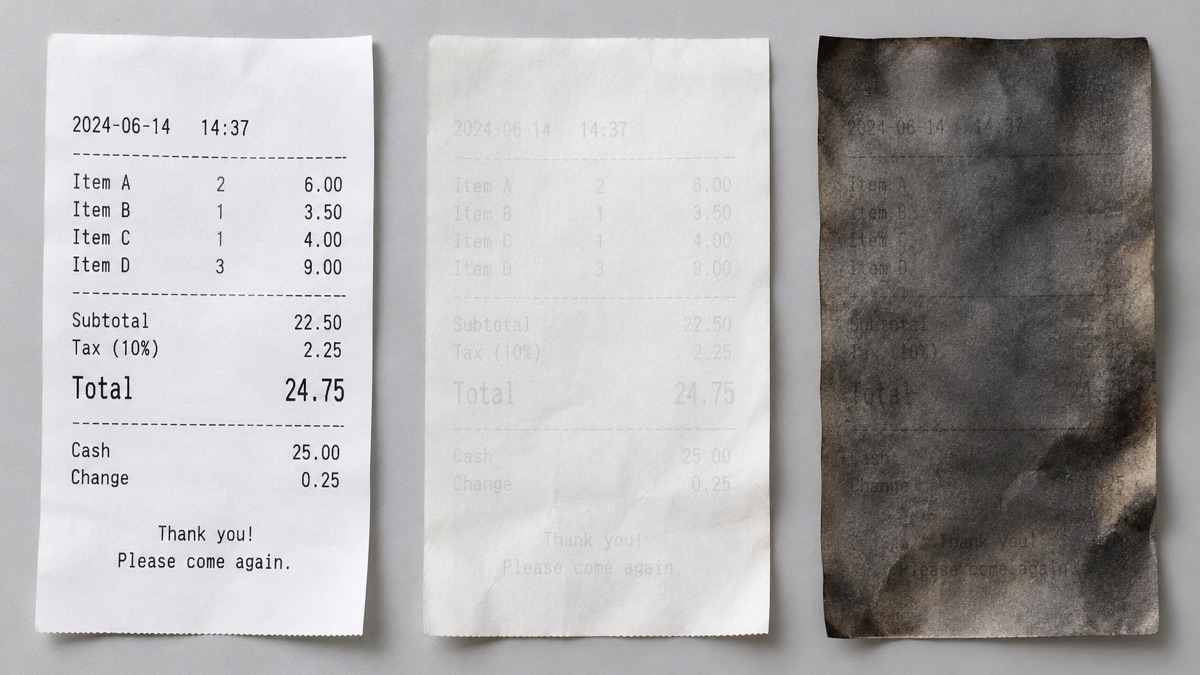
You pull a receipt out of a drawer and it's either blank white or dark all over, with nothing you can read. So you search for how to restore a faded receipt. Here's the honest answer up front: bringing the text back on the paper itself is very unlikely. But there are still ways to recover the details you need.
Can you restore a faded receipt?
Most receipts printed after a card payment are thermal paper. Instead of ink, the paper has a coating that reacts to heat to form the text. Once that coating has changed, there's no reliable way to reverse it.
You'll see advice online about using a hair dryer or an iron. We don't recommend it. Thermal paper reacts to heat, so it can darken the entire sheet and wipe out whatever text was still there.
Why did my receipt turn black, or fade?
A thermal receipt can go wrong in two different ways. The causes below are the commonly cited ones, and the exact behavior varies by receipt because the coatings differ.
- A faded receipt — the text weakens over time or after long exposure to sunlight and humidity. Sitting against a vinyl sleeve or the plastic pocket of a wallet for a long time is also said to cause it.
- A receipt that turned black — the paper can darken when it's exposed to heat (a hot car, a spot near a heater), when it's scratched or pressed, or when something like hand cream or hand sanitizer gets on it.
How to recover a blurry receipt when some text is still visible
If you can still make out some of it, move it into a photo before it gets worse.
- Lay the receipt flat in bright, even light and shoot straight on. Turn the flash off, since glare from the paper can wash out faint text. Watch for shadows.
- Take a few shots. Change the angle and brightness slightly, and one of them will usually come out clearer.
- In your photo app's editor, switch to black and white and raise the contrast. That can make faint text stand out.
Text that you can't see at all with your eyes won't show up in a photo either.
How to recover faded receipts when the text is completely gone
Look for the same purchase in another place instead of on the paper.
- Your card app or statement: date and time, merchant, amount
- Payment notifications and history in your bank or mobile payment app
- Online order history, membership apps, or emailed receipts
- The store where you paid: some stores can look the transaction up by date and card details
Whether these records are accepted in place of the original for a refund or tax filing can vary by situation and institution, so we can't say definitively. It's safest to check with whoever needs it.
Next time, photograph the receipt right away
Every one of these cases ends the same way: get the information off the paper before it changes.
With Pilofy, you save one photo of the receipt and it reads the store name, date, amount, and what you bought, then organizes it into an expense card. For a purchase with no paper receipt, saving a screenshot of the card approval notification works too. If the text is already too faint to read even by eye, recognition accuracy can drop, so the safest move is to photograph it before it fades.

Pilofy is coming soon with iOS 27, processed on-device through Apple Intelligence, so your photos never leave your phone.